Updated September 2026
KGMU Online Appointment 2026: OPD Booking & Registration Guide
If you are planning a KGMU OPD visit, start by confirming three things before you book: whether this is a first visit or follow-up, the department you need, and the day or clinic written on any referral or previous prescription. The online appointment is one part of the visit; this guide takes you through booking, registration, department schedule, location and what to keep ready before you travel to Lucknow.
KGMU online appointment 2026: quick details
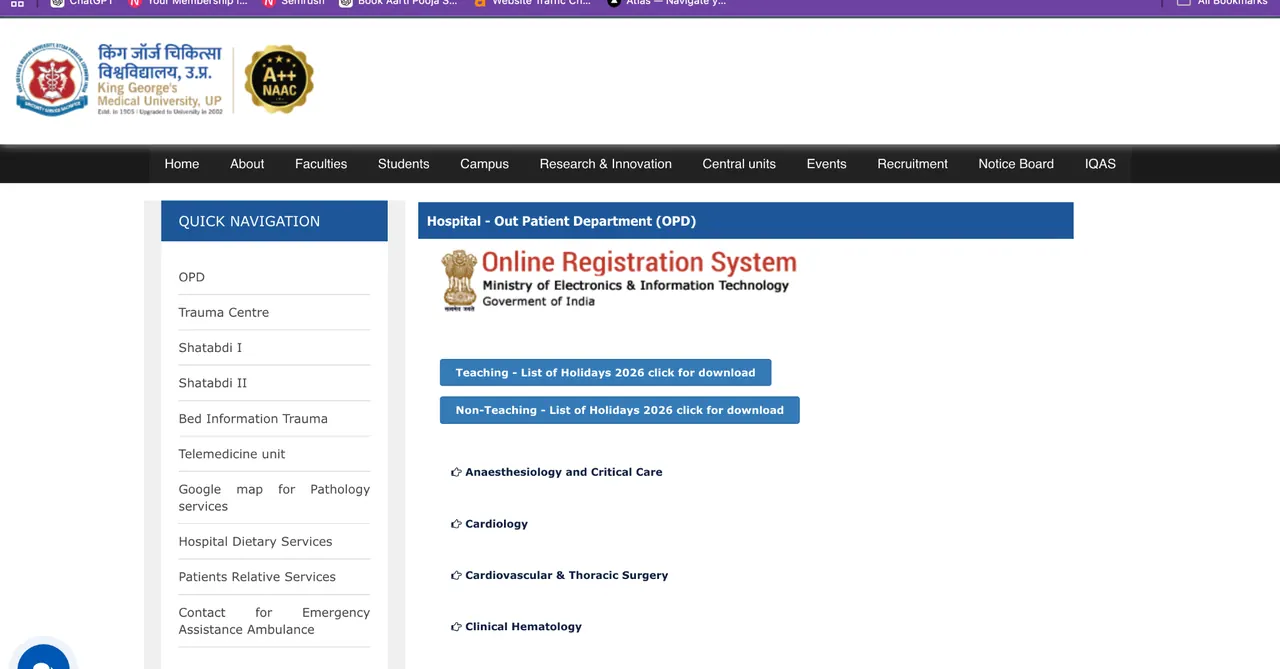
| KGMU OPD detail | Information |
|---|---|
| Hospital | King George’s Medical University (KGMU), Lucknow |
| Online booking portal | ORS Patient Portal (ors.gov.in) |
| Patients | New and returning/follow-up patients where the service is available |
| OPD registration charge | ₹50 |
| Registration validity | Up to six months |
| Appointment support | 0522-2258880 / 0522-3539333 |
| Department schedule | Varies by department, unit or specialty clinic |
| Emergency care | Separate from routine OPD booking |
How to book KGMU OPD appointment online
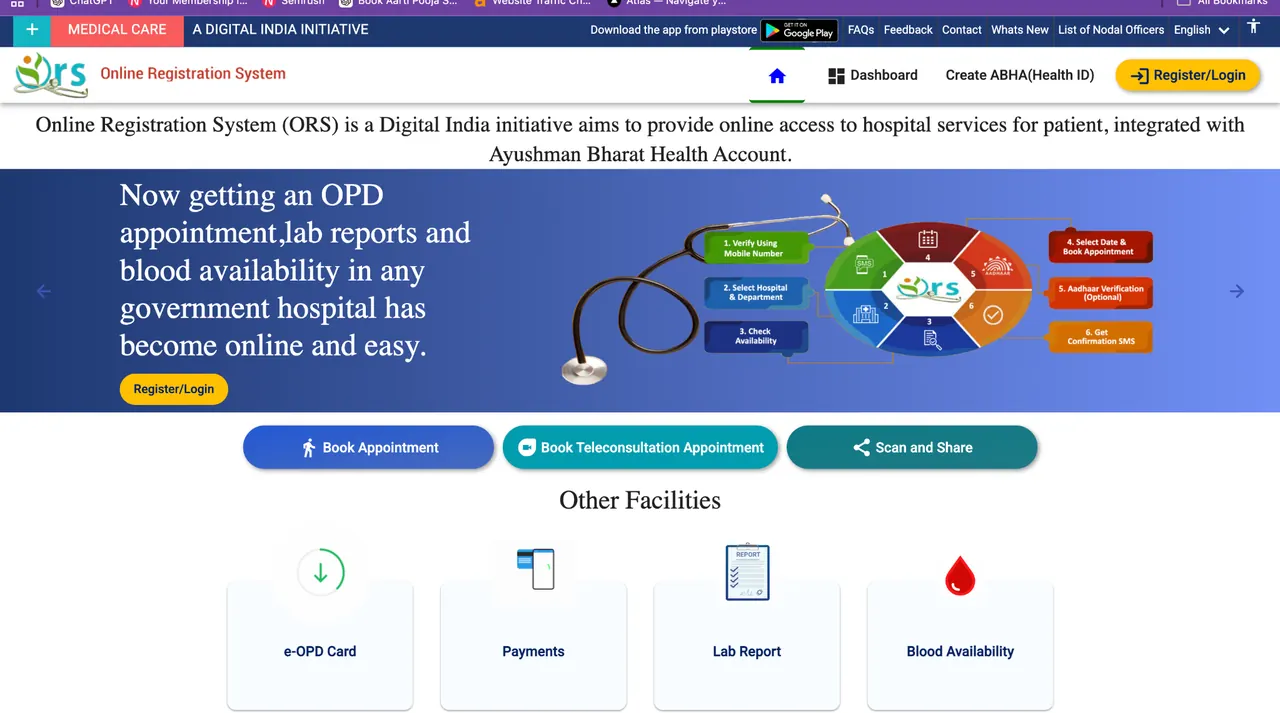
Use the live ORS portal rather than an old screenshot because button names and the order of screens can change. The core booking sequence remains the same: identify the patient, choose the hospital and department, select an available date and save the confirmation.
Step 1: Open the ORS Patient Portal
The KGMU online appointment flow is available through the Government of India ORS Patient Portal. When you are ready to begin the booking, open the appointment screen and then follow the hospital-selection steps below. Keep this guide open in another tab if you are booking for the first time.
Step 2: Login or register
Use the login/registration option shown on the portal. Depending on the live interface, patient verification can use a mobile number, OTP, ABHA-related identity or an existing hospital/UHID route.
Step 3: Select Uttar Pradesh and KGMU Lucknow
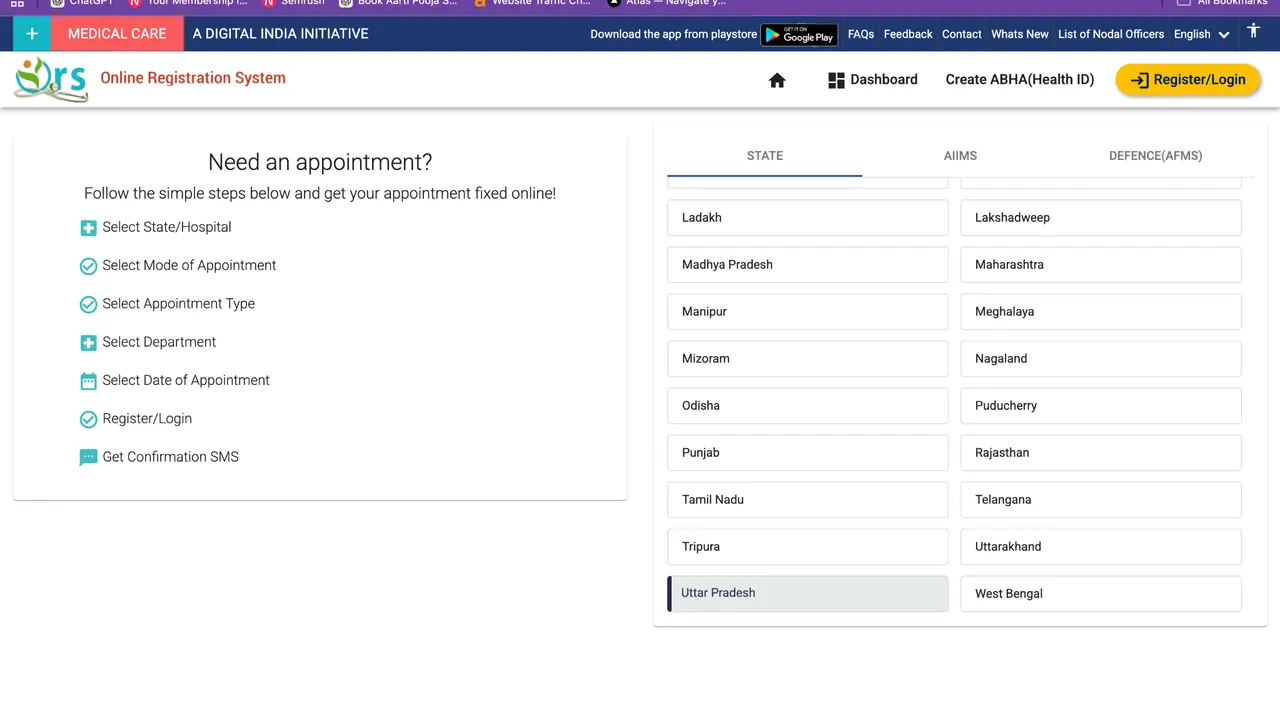
When the portal asks for the state and hospital, choose Uttar Pradesh and then King George’s Medical University, Lucknow where listed.
Step 4: Choose the KGMU department
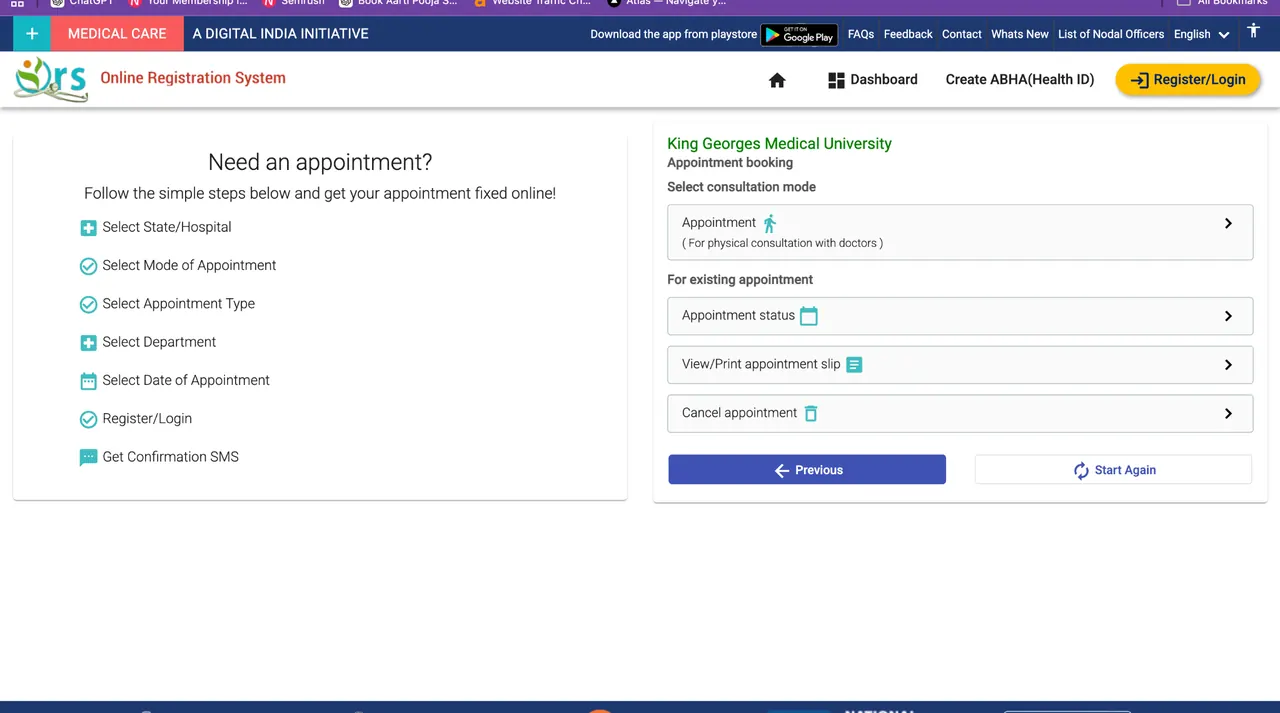
Select the department written on the referral, previous prescription or current KGMU record. Do not choose another specialty merely because it has an earlier available date.
Step 5: Choose an available date
Select one of the dates released for that department. If your visit is a follow-up, compare the date with the unit/clinic written on the previous KGMU record.
Step 6: Enter and verify patient details
Complete the fields shown for the patient. Check the name, mobile number, date of birth/age and any existing patient information before continuing.
Step 7: Review the hospital, department and date
Before submission, confirm that the hospital is KGMU Lucknow and that the department/date match the visit you are planning.
Step 8: Confirm the appointment
Submit the booking and wait for the appointment/registration acknowledgement shown by the portal.
Step 9: Save the KGMU appointment slip
Save the confirmation, registration/appointment number, SMS and downloadable slip if one is generated. A screenshot or PDF copy is useful when mobile network access is poor at the hospital.
Step 10: Check the OPD schedule and location
Before travelling, check the recurring department schedule and the patient-facing building/floor/room. The appointment date alone does not tell you where every KGMU department reports.
KGMU appointment for a new patient
A first-time patient should keep accurate identification and contact details ready before starting the booking. The online appointment can create or connect patient information, but the hospital visit can still include registration verification and local OPD reporting before the consultation.
Details to keep ready
- Patient’s full name and correct age/date of birth.
- Active mobile number that can receive OTP/SMS.
- Address and identity details requested by the live booking system.
- Referral letter when another doctor/hospital has referred the patient.
- Relevant previous reports if the visit depends on an existing diagnosis or referral.
What happens after the first booking
Save the generated patient/appointment details and use the same patient identity on later follow-ups wherever the KGMU workflow allows it. Outpatient registration is valid for up to six months, so preserving the existing KGMU record can simplify follow-up care.
KGMU appointment for returning and follow-up patients
Returning patients should keep the previous KGMU UHID, OPD slip, prescription and written follow-up date available. A generic appointment date is not always enough: Orthopaedic Surgery can use separate Main and Follow-Up OPD days, Neurology has week-of-month specialty clinics, and Psychiatry and Respiratory Medicine use unit/clinic patterns.
Before booking a follow-up
- Read the latest prescription for the department, unit or clinic name.
- Check the written return date or follow-up instruction.
- Use the same patient identity/UHID where the booking route supports it.
- Keep investigations requested at the last consultation ready for review.
KGMU OPD registration fee in 2026
The current KGMU outpatient registration charge is ₹50 and the registration is valid for up to six months. This replaces older online information that still mentions a ₹1 OPD ticket. The ₹50 amount is the registration charge; investigations, procedures or other hospital services can have separate charges.
| Charge | Amount / validity |
|---|---|
| Outpatient registration | ₹50 |
| Registration validity | Up to 6 months |
| Hospital admission | ₹250 |
| Professional consultation for admitted patients | Free, as listed by KGMU Finance |
Choose the correct KGMU department before booking
The department name matters more than choosing the earliest available date. If you already have a referral or KGMU prescription, use the specialty written there. Common patient terms can differ from the formal department name—for example ENT maps to Otorhinolaryngology & Head-Neck Surgery and Eye maps to Ophthalmology.
Find a KGMU department
Select a department or search its common patient-facing name such as ENT, Eye, Gastro, Lari, RCT or Braces.
Can you book a KGMU appointment with a specific doctor?
Not every online booking route guarantees selection of a named consultant. Many KGMU appointments are organized by department, unit or OPD day, while the doctor seeing the patient follows the roster operating on that date. If a previous KGMU prescription specifically asks you to return to a doctor or unit, use that written instruction together with the department schedule.
KGMU appointment slot not available: what to check
The online quota may be full
Released appointments for the selected department/date may already be booked. Check another suitable date rather than choosing an unrelated specialty.
The department may not run that day
Departments with unit-based or specialty schedules may only have OPD on selected weekdays.
Future dates may not have opened
The portal may release appointment dates within a limited booking window.
A holiday or temporary change may apply
A recurring OPD schedule does not guarantee normal operation on every public holiday.
Online booking may be temporarily unavailable
A portal issue does not automatically mean the physical department is closed. Use the appointment-support numbers if the booking problem continues.
Check the KGMU OPD schedule after booking
A confirmed appointment tells you the booked department and date. The OPD schedule adds the recurring doctor, unit or specialty-clinic pattern. This is especially useful when the visit depends on a named unit or follow-up clinic.
Check KGMU OPD schedule
Choose a department for which a current structured schedule has been verified. Then narrow the result by weekday, unit, clinic or doctor where KGMU publishes those details.
Find the KGMU building, floor or room after booking
KGMU is spread across New OPD, Old OPD, Main Hospital, Shatabdi hospitals, Queen Mary, Lari Cardiology, Dental, Psychiatry and other facilities. A department’s administrative address is not always its routine OPD location. Use the Campus Navigator when the booking confirmation does not make the patient-facing destination clear.
Find a KGMU patient location
Search by department or building. Results distinguish OPD, department, ward, laboratory, procedure and emergency locations.
What to save after a KGMU online appointment
- Appointment confirmation or SMS.
- Appointment/registration number.
- Downloaded OPD slip or PDF where generated.
- Mobile number used for verification.
- Selected department and date.
- Existing UHID/old OPD details for a returning patient.
- Referral or written follow-up instruction.
What to carry to KGMU on the appointment day
| Document | Why it helps |
|---|---|
| Appointment confirmation / slip | Shows the booked department/date and registration details. |
| Existing UHID / OPD slip | Helps link a returning patient with the previous record. |
| Previous prescription | Shows follow-up date, unit/clinic and treatment context. |
| Referral letter | Useful when another hospital or doctor has referred the patient. |
| Relevant reports | For investigations already requested or performed. |
| Photo ID / identity details | Carry where required by the hospital or booking workflow. |
What happens after reaching KGMU with an online appointment
- Keep the appointment slip or confirmation ready.
- Go to the correct patient-facing building/OPD.
- Complete registration verification or counter formalities if required.
- Confirm the department/unit/clinic shown on the appointment or previous record.
- Follow the local queue/token process used by that OPD.
- Keep previous reports and prescriptions ready for the consultation.
KGMU online appointment support numbers
| Purpose | Number |
|---|---|
| Online OPD appointment support | 0522-2258880 |
| Additional online appointment support | 0522-3539333 |
| KGMU Helpline | 0522-2258880 |
| Emergency / Trauma assistance | +91 94530 04209 |
Appointment privacy and OTP safety
- Enter OTP only on the patient service you intentionally opened.
- Do not share Aadhaar OTP, ABHA OTP, UPI PIN, banking PIN or account passwords with an unknown person offering to book an appointment.
- Keep the mobile number used for booking accessible until the visit is complete.
- Do not send full medical records to unknown numbers merely to obtain a routine appointment.
Can a KGMU appointment be cancelled or booked again?
Appointment-management options depend on what the live ORS account shows for the booking. Where a cancellation option is available, use it for a future booking that you will not attend. If a dedicated reschedule option is not shown, the practical route may be to cancel the old booking and choose another available date. Keep the appointment number and registered mobile number until the visit is complete.
KGMU appointment confirmation or slip not showing
If the booking appeared successful but the slip is missing, first check the appointment account, browser downloads, phone Files/Downloads folder, SMS and screenshots. Do not immediately create another patient record if the appointment number already exists. Use the appointment-support numbers when the booking cannot be retrieved.
KGMU online appointment from a mobile phone
The ORS portal can be used from a mobile browser. Use a phone number you can access during booking and on the visit day, because OTP verification and appointment retrieval can depend on it. Save the final confirmation as both a screenshot and downloadable file where possible.
Examples: appointment planning by department
Neurology appointment
After choosing Neurology, compare the appointment date with the Neurology roster. Wednesday is used for week-of-month specialty clinics, so a returning patient should pay particular attention to the clinic written on the previous prescription.
Orthopaedic Surgery appointment
A first Orthopaedic appointment can begin with the general department route, but follow-up patients should preserve the unit number because Main OPD and Follow-Up OPD days differ by unit.
Urology appointment
Urology publishes Monday-to-Saturday OPD from 9 AM–2 PM in New OPD rooms 420/421, with different doctors on different weekdays.
Queen Mary / Obstetrics appointment
Obstetrics & Gynaecology services use Queen Mary Hospital. Planned ANC, Gynaecology and maternity pathways should not be treated as a generic New OPD visit.
Frequently asked questions about KGMU online appointment
How can I book KGMU OPD online?
Open ors.gov.in, select the KGMU hospital option where offered, choose the required department and available date, complete patient verification and save the confirmation.
What is the KGMU OPD registration fee in 2026?
Outpatient registration is ₹50 and is valid for up to six months.
Can a new patient book online?
Yes, supported online appointment/registration flows can be used for first-time patients. Complete the patient details shown by the live system.
Can returning patients use their old KGMU record?
Keep the existing UHID/OPD details and use them where the booking workflow supports returning patients.
Can I select a specific doctor?
Not for every service. Many appointments are department/unit based and the doctor depends on the recurring roster.
What if no slot is available?
Check another suitable date, confirm the department’s actual OPD day and call the appointment-support number if needed.
Is an online appointment required for an emergency?
No. Emergency care follows a separate hospital pathway; do not wait for a routine OPD appointment in an emergency.
Can I use ORS from a mobile phone?
Yes. Keep the registered mobile number available for OTP/confirmation and save the final appointment details on the phone.